Refund a member
You hate to see it, but refunds are a part of business life. Thankfully, VisionHQ has made issuing refunds easy.
IMPORTANT NOTE
Issuing a refund does NOT cancel a plan
The Classic Refund
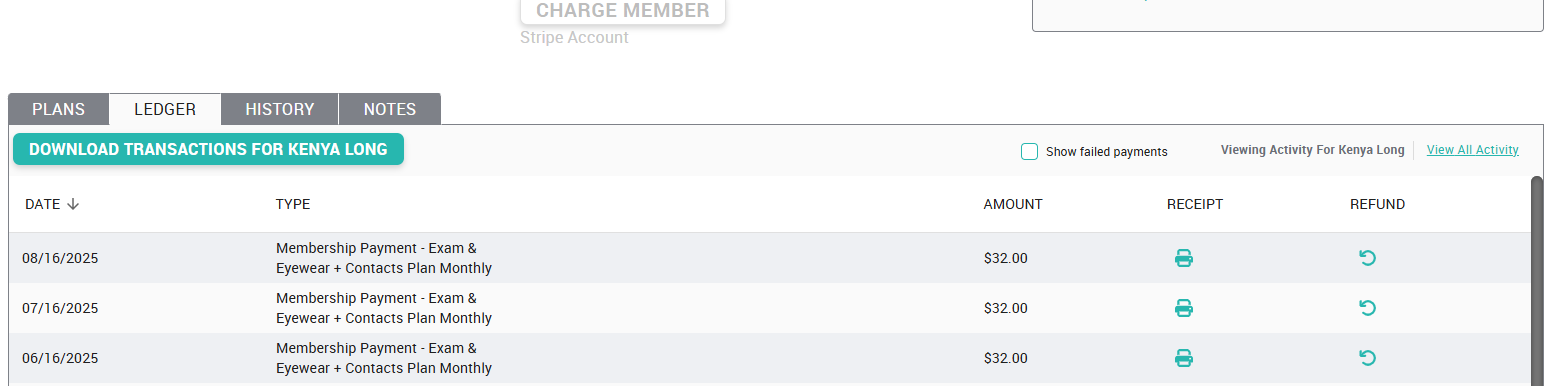
On the patient's ledger tab, you'll see each transaction listed. Click the "Refund" button on the specific transaction that needs to be refunded. Enter the amount of the refund, the reason, confirm and call it a day. The system will allow a refund of any amount up to the total amount paid by the member, and the refund will ALWAYS be issued back to the original payment method.
The Change-Plan-and-Refund Refund
Click the 'change plan' link on the right side of the member's account, choose a plan that costs less than their current plan, and follow the prompts to issue a refund when changing the plan. The system will allow a refund of any amount up to the total amount paid by the member, and the refund will ALWAYS be issued back to the original payment method.
Something unexpected with your refund? Getting an error message? Send an email to support@vision-hq.com and let us know the specific error you're getting.
Related Articles
How To: Change a member's plan
Navigate to the Members tab Select the member in question from the list Click the 'change plan' link under the “Actions” button of Roger's “Plans”' tab and follow the prompts. Select the new plan Select the effective date Immediately On Term Renewal ...How To: Cancel a member's plan
Important info: Please note that EVERY member that has enrolled in a plan is locked into a 12 month term. They agree to this the moment they enroll and it’s defined in the terms & conditions. This means you should NOT be cancelling a monthly paying ...Can a member pay the balance of their monthly membership?
Yes. In your platform, this is accomplished by switching their monthly membership to an annual membership and applying the payments already received, then collecting the remaining balance. Confused? Don't be. Check it out: Click the "Actions Button" ...Early Renewal When a Member's Plan is Pending a Change
Here you'll find step by step instructions on how to handle instances when patients come into the office and are wanting to renew their plan while there is a pending plan change in effect on the account. You will likely see this 'change pending' ...How Contracts Work When a Member Wants to Cancel
Regardless of how your members choose to pay, (whether monthly or annually) they are locked into a 12 month contract or term. By their enrollment, patients are automatically agreeing to our Terms & Conditions which bring them into this 12 month ...