Add plans for insured patients
Increase patient care for both insured and uninsured patients with VisionHQ.
While creating or editing a membership plan, to designate a plan that is available to insured patients, simply check the box "For Insured Patients"
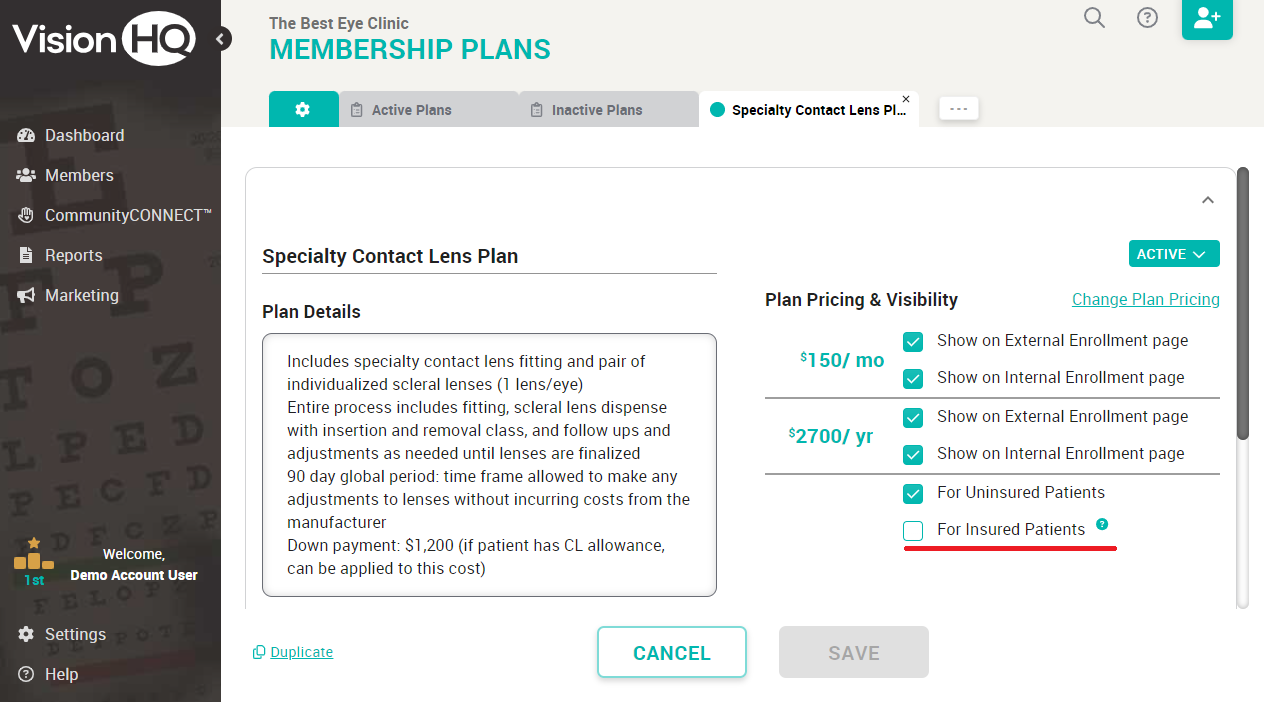
Patient care goes beyond just treating symptoms, it’s about offering accessible, affordable, and comprehensive care for everyone. By creating flexible membership plans tailored to each patient’s needs, you’re providing a safety net for those without insurance and enhancing the benefits for those with insurance. This inclusive approach ensures that your patients receive consistent, high-quality care.
Still need some help? No problem! Schedule some time with our success team and we’ll get you up and running in no time.
Related Articles
Creating Your Membership Plans
⚠️ Important: Avoid using insurance terminology and terms such as insurance, comprehensive, benefits when creating your plans. Keep it simple and patient-friendly. Step 1. Plan Offerings Pro-Tips: Keep offerings simple—less is more. Use plain ...Launching & Marketing Your Plans
1. Sending Email & Text Blasts Informing ALL your patients of your membership plans is a great way to get immediate members. We've written the email and text blasts for you. You'll find our templates under the Marketing tab, accessible in your left ...Add a member to an account
You can add a family member to any account in any status as long as a valid payment method is attached to the account. Click the account in the member list to expand the account details, and click the "Add Family Member" button. It's worth noting ...How to add Users
Click Settings > Users Under “Add New User”, enter the requested information Click “+Set Permissions” Select an option: Standard or Admin Optional: Check the “Plan Coordinator” box under Admin There is only one Plan Coordinator per office. That ...How do I add a link to our plans / enrollment page on our website?
With a little help from your Web Developer, you can have a “Widget” added to your website! Click “Marketing” Click Success Hub Click theto open and view your enrollment page in a new window. Or, click to copy the link. You can now paste this link ...