Change a member's payment date
To change when next a member gets charged, you may navigate to the member's account. Under the "Actions Button" you'll find a function to adjust the member's next draw date.
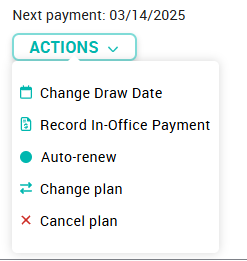
For example, Jessica joins your membership plan on August 8, but wants payments drafted on the 15th of each month.
Related Articles
How To: Change a member's plan
Navigate to the Members tab Select the member in question from the list Click the 'change plan' link under the “Actions” button of Roger's “Plans”' tab and follow the prompts. Select the new plan Select the effective date Immediately On Term Renewal ...Change a member's term date
This a two step process that involves changing a member's next payment date as well as term dates. Click on the Pencil icon next to the member's Term dates and use the check icon to save the changes. If you want to change a member's payment date, ...Change a member's payment method
A number of different payment methods can be stored to a member account, but only one can be 'active' at any given moment. When a member first enrolls, the payment method entered will be securely stored with the payment processor, and used for all ...Change an in-office payor's next payment date
After adding an in-office payor's membership, you can adjust the Next Payment Date by editing the Contract Term for that subscription. The end date for the term will automatically be stored as the Next payment date.Backdate a member's account
If you want an account backdated to reflect a start date prior to the day they were enrolled in the platform First step is to update the contract dates, by clicking on the tool next to member's term dates in the form of a pencil icon. A green check ...