Backdate a member's account
If you want an account backdated to reflect a start date prior to the day they were enrolled in the platform
First step is to update the contract dates, by clicking on the tool next to member's term dates in the form of a pencil icon.
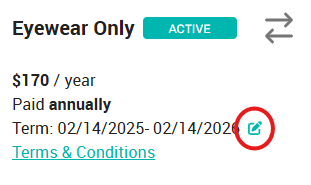
A green check mark will show up which you may click on to save the change.
The second step is to adjust the next payment date to match by clicking on the "Actions button" then "Change Draw Date"
Related Articles
Resolving a Member account
If a member is unable to make the regularly-scheduled monthly payments on their membership, their account may go delinquent. This means the member has an outstanding balance on their membership plan, and we have been unable to collect through the ...Add a member to an account
You can add a family member to any account in any status as long as a valid payment method is attached to the account. Click the account in the member list to expand the account details, and click the "Add Family Member" button. It's worth noting ...How to: Charge a member manually
Locate the member's account Select “Charge member” Type the amount Select a reason from the dropdown Add a brief description to appear in their ledger Type your full name in the box Click the blue button * - You may need to click the "View Account ...Transfer a member to another office
Overview We’ve introduced a feature that enables seamless account transfers between locations. This enhancement simplifies the process of moving member accounts, ensuring a smooth transition within your system. How to Transfer an Account Transferring ...How To: Cancel a member's plan
Important info: Please note that EVERY member that has enrolled in a plan is locked into a 12 month term. They agree to this the moment they enroll and it’s defined in the terms & conditions. This means you should NOT be cancelling a monthly paying ...