Display your plans in Spanish
The VisionHQ platform offers you the option of displaying your plans in Spanish on your enrollment page. You provide the Spanish versions of your plan titles and descriptions, and we'll do the rest!
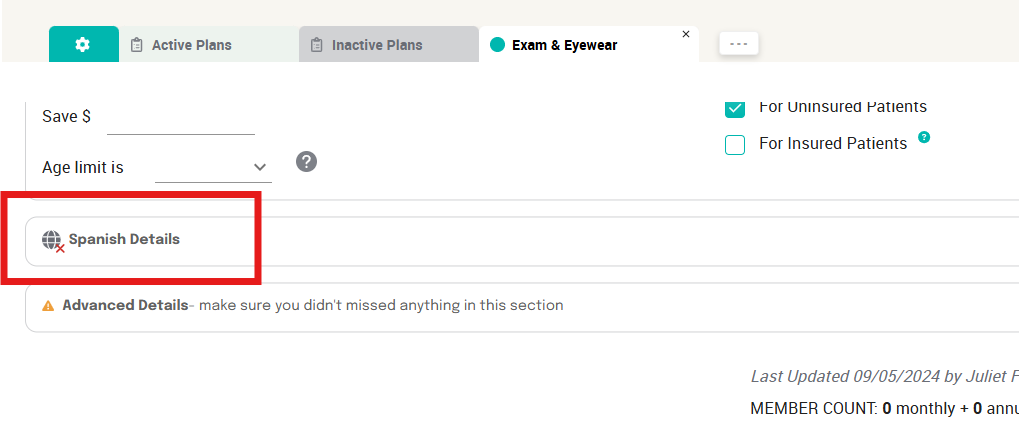
In your plan editor window, click the Spanish Details option and provide the plan name and description in Spanish.
When you save the plan, a toggle will appear at the top right of your enrollment page*.
Any member that enrolls using the Spanish version of your enrollment page will receive all automated plan correspondence in Spanish.
Related Articles
Launching & Marketing Your Plans
1. Sending Email & Text Blasts Informing ALL your patients of your membership plans is a great way to get immediate members. We've written the email and text blasts for you. You'll find our templates under the Marketing tab, accessible in your left ...Creating Your Membership Plans
⚠️ Important: Avoid using insurance terminology and terms such as insurance, comprehensive, benefits when creating your plans. Keep it simple and patient-friendly. Step 1. Plan Offerings Pro-Tips: Keep offerings simple—less is more. Use plain ...Add plans for insured patients
Increase patient care for both insured and uninsured patients with VisionHQ. While creating or editing a membership plan, to designate a plan that is available to insured patients, simply check the box "For Insured Patients" Patient care goes beyond ...How do I add a link to our plans / enrollment page on our website?
With a little help from your Web Developer, you can have a “Widget” added to your website! Click “Marketing” Click Success Hub Click theto open and view your enrollment page in a new window. Or, click to copy the link. You can now paste this link ...How to order marketing materials
Click Marketing Click "Print Materials" Follow the prompts… Select your plans and quantity Verify your logo and office information Enter your payment method Enter a name, email, and phone number for the person who will approve the proof Once your ...