How To: Change Enrollment Page Theme
Chances are, you selected an enrollment page theme while you were enrolling your office. But if you've changed your mind, are going through a rebranding of your practice, or just like to shake things up a bit, you can easily change your color scheme.
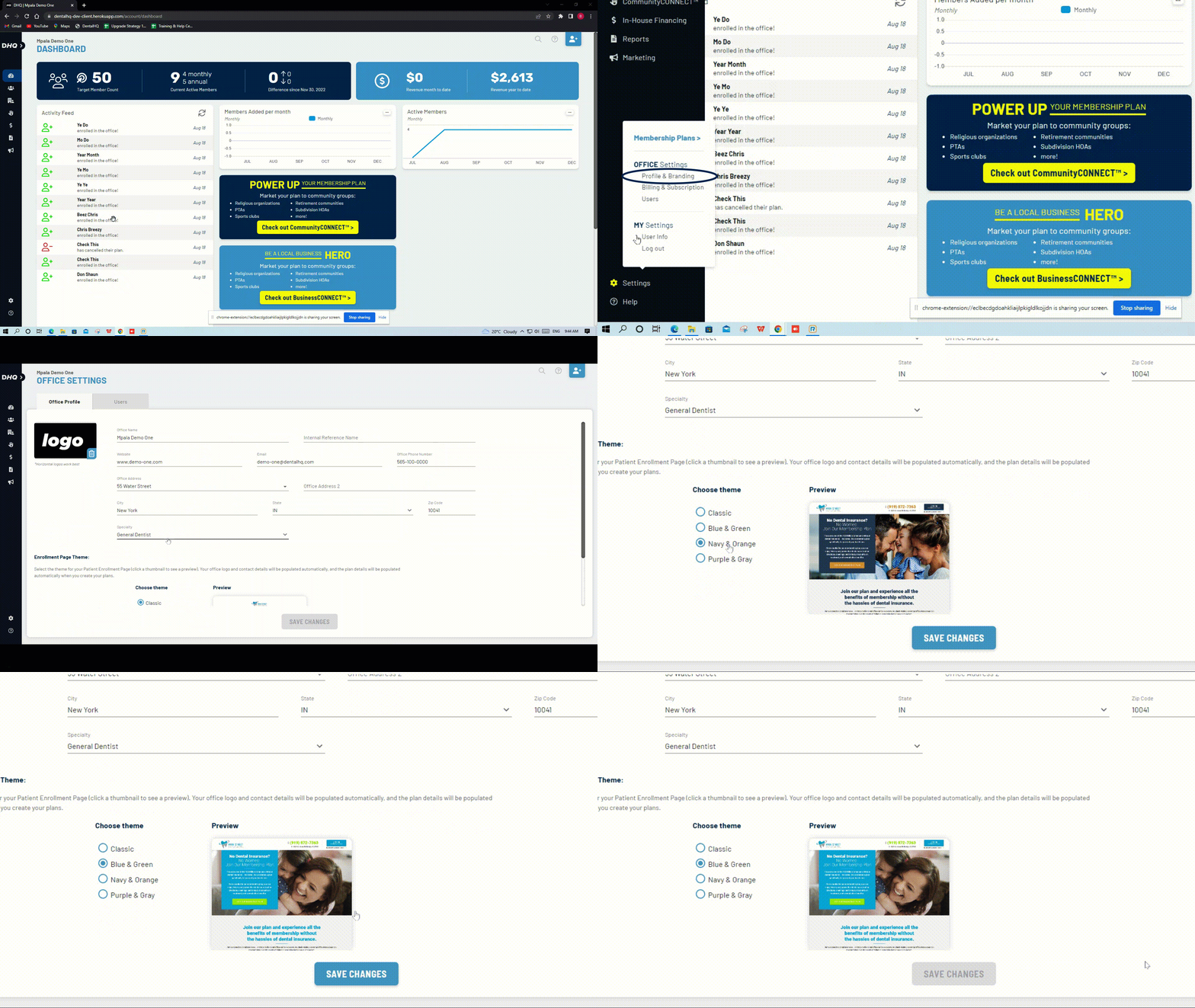
- Go to the Settings tab
- Under Office Settings, select Profile & Branding
- Scroll down to "Enrollment Page Theme:"
- Stop reading this because it's intuitive and you've already figured it out on your own.
Don't forget to click when you're done!
Related Articles
How do I add a link to our plans / enrollment page on our website?
With a little help from your Web Developer, you can have a “Widget” added to your website! Click “Marketing” Click Success Hub Click theto open and view your enrollment page in a new window. Or, click to copy the link. You can now paste this link ...Activity Page (a.k.a. Reports)
TL;DR The "Activity" page is your newly designed Reports Page. Payout Reports, Monthly Reports, and Payment Ledger, all in one place. Taking cues from many online banking websites, we've organized all reports on one page with an activity ledger – aka ...How to change payouts bank account information
To change the payouts bank account, click on Settings on the bottom left of your screen, then click Billing & Subscription. You'll see a link that says "Update Bank Account for Payouts" which you can use to make the update. This article addresses ...Customize Your Patient Sign-up Page
You now have the ability to personalize your Patient Sign-up Page with your branded colors and a selection of images. This feature allows you to create a professional and cohesive look that aligns with your brand identity. This is the page we ...Change a member's term date
This a two step process that involves changing a member's next payment date as well as term dates. Click on the Pencil icon next to the member's Term dates and use the check icon to save the changes. If you want to change a member's payment date, ...