How to change payouts bank account information
To change the payouts bank account, click on Settings on the bottom left of your screen, then click Billing & Subscription.
You'll see a link that says "Update Bank Account for Payouts" which you can use to make the update.
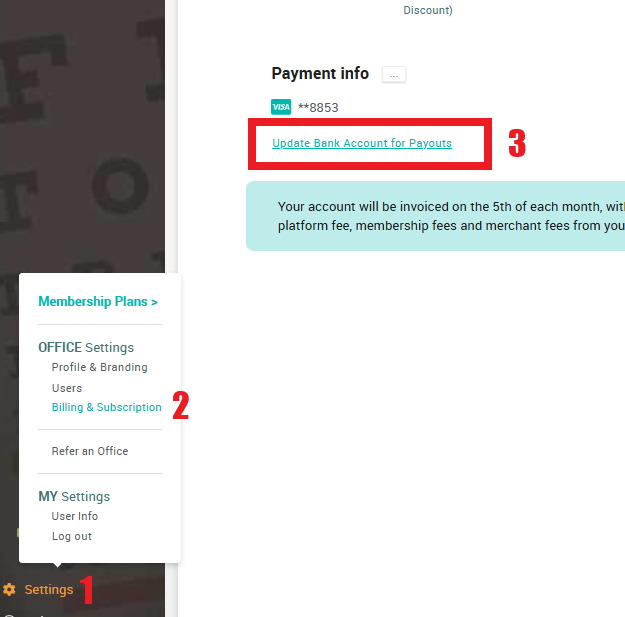
This article addresses changing the account where your gross membership plan revenue is deposited each month. To change the credit/debit card that is charged for use of our platform each month; on the same page Click on the 3 dots next to the Payment Info header
Related Articles
Why do you need my bank account
This information is gathered as part of the verification process. Stripe, our payment processor, verifies your SSN to confirm that you are the owner of the associated business entity and are authorized to conduct business under the EIN. The bank ...Change a member's payment method
A number of different payment methods can be stored to a member account, but only one can be 'active' at any given moment. When a member first enrolls, the payment method entered will be securely stored with the payment processor, and used for all ...Change a member's payment date
To change when next a member gets charged, you may navigate to the member's account. Under the "Actions Button" you'll find a function to adjust the member's next draw date. For example, Jessica joins your membership plan on August 8, but wants ...Switch a member's account from in-office payments to a credit/debit card on file
Some members will realize the convenience of automatic renewal, and they'll want that kind of happiness in their lives. When the lightbulb comes on, it's an easy change to make: Click the 3 dots next to the Payment Info header. You’ll see an "Add ...Backdate a member's account
If you want an account backdated to reflect a start date prior to the day they were enrolled in the platform First step is to update the contract dates, by clicking on the tool next to member's term dates in the form of a pencil icon. A green check ...