Accept in-office payment for membership fees
The platform allows you to receive payment for annually renewing plans in your office. This means you can accept cash, check, HSA, FSA, and whatever other payment source you already accept in your office for a member's annual membership fees.
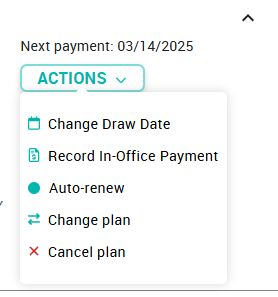
Monthly membership fees must always have a card on file - we wouldn't dream of putting that administrative burden on you and your team! In the case that a monthly member wishes to make an in office payment in the middle of their term, you may click on the "Actions Button" and then Record In-Office Payment.
To accept payment through existing in-office channels, when arriving at the Checkout Tab during enrollment, simply click the blue "collect payment in office" link below the total.
You'll be asked to print the Member Agreement before completing the member's enrollment, so don't forget to return to and submit the Add Member form after printing the Member Agreement.
NOTE: This is an account-level setting--meaning it is an all-or-nothing decision. All members on a given account either pay for their membership through the DentalHQ platform, or via payment collected in the office.
Related Articles
Tracking membership payments and treatments
5 Best Practices to Track Treatment and Payment With your Vision Membership Plan The key to tracking membership plan treatmentsand payments is separating the two. Fees paid for membership plans should be posted in a dummy patient account, once a ...Implementing Payment Collection Systems in Your Office
Overview Ensuring accurate payment tracking in your office is crucial for financial management and membership renewals. Below are recommended systems for enrolling patients, posting payments to your PMS, and handling membership plan payments ...Accidentally clicked "collect payment in office"
If you've accidentally clicked the "collect payment in office" link, but you didn't actually collect a payment in the office and prefer to process the patient's payment on the VisionHQ portal, please email our support team to resolve the issue. ...Change an in-office payor's next payment date
After adding an in-office payor's membership, you can adjust the Next Payment Date by editing the Contract Term for that subscription. The end date for the term will automatically be stored as the Next payment date.Change a member's payment method
A number of different payment methods can be stored to a member account, but only one can be 'active' at any given moment. When a member first enrolls, the payment method entered will be securely stored with the payment processor, and used for all ...