How to: Enable/Disable Text (SMS) Notifications for a Member
NOTE: This article covers how to enable/disable text notifications for a member. To disable text notifications for all members at the office level, click here.
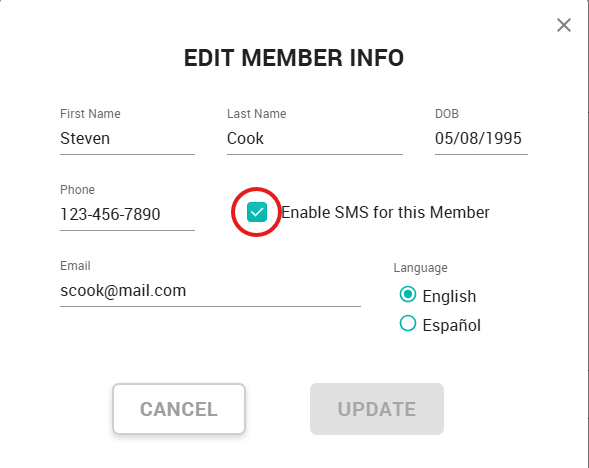
From your Dashboard:
- Click Members
- Select a member
- Click Edit next to Member info
- Check/Uncheck Enable SMS for this Member
- Click Update
For more information about SMS notifications, including a list of notifications your member will receive, click here.
Related Articles
How to: Enable/Disable Text (SMS) Notifications for the entire Office
NOTE: This article covers how to enable/disable text notifications for all members. To disable text notifications for a member on their Member Detail page, click here. Click on Settings on the bottom left menu option: Click Manage Click Profile & ...Deep Dive: Text Notifications
HOW TO: Enable/Disable text notifications for a specific member Enable/Disable text notifications at the office level Notifications a member may receive: New Member Enrollment Confirmation Member Added Confirmation Plan Changed Confirmation Plan ...Member Statuses
In your Member List, the badges next to each member's name denote their current status. The color and the text tell you the full story: - Green means this member currently has an active membership. The text may read “ACTIVE” or “PAID IN OFFICE”. - ...Early Renewal When a Member's Plan is Pending a Change
Here you'll find step by step instructions on how to handle instances when patients come into the office and are wanting to renew their plan while there is a pending plan change in effect on the account. You will likely see this 'change pending' ...Edit a member's name
Need to correct a typo on a member's name? Click the Edit button under the Member Info section. If the member is the account owner, you can also change the phone number and email address for the account.